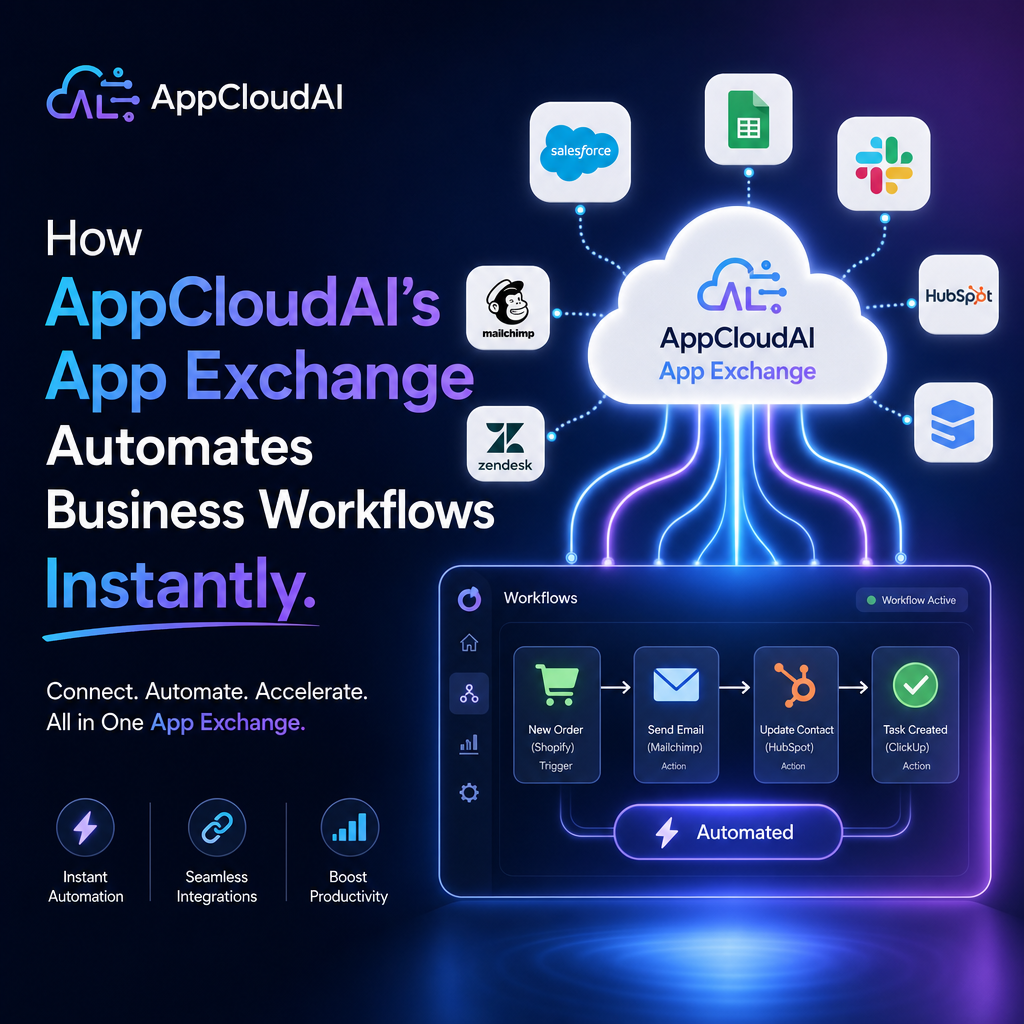
How AppCloudAI’s App Exchange Automates Business Workflows Instantly
Why Faster Workflow Automation Matters
Every business wants to save time, reduce manual work, and move faster without adding complexity. The problem is that many teams still rely on disconnected tools, repetitive data entry, and approval processes that slow everything down.
That is where AppCloudAI’s App Exchange becomes especially valuable. Instead of spending weeks building custom integrations or searching for the right automation setup, businesses can use a ready-to-go ecosystem that helps them connect apps and automate workflows instantly.

For companies trying to improve efficiency, reduce errors, and scale operations, this kind of speed is a major advantage.
What Is AppCloudAI’s App Exchange?
AppCloudAI’s App Exchange is a marketplace-style hub where businesses can discover apps, integrations, and workflow solutions designed to work together inside the AppCloudAI environment.

Rather than building every process from scratch, teams can quickly access tools that support common business functions such as:

- CRM updates
- Lead routing
- Customer support workflows
- Sales notifications
- Project handoffs
- Marketing automation
- Data syncing between platforms
This approach removes much of the friction that usually comes with workflow automation.
How It Helps Businesses Automate Workflows Instantly
1. Prebuilt Integrations Reduce Setup Time
One of the biggest barriers to automation is technical setup. Many businesses know what they want to automate, but getting systems to communicate often takes too much time and developer effort.
With AppCloudAI’s App Exchange, businesses can use prebuilt integrations and app connections to launch workflows much faster. That means less time spent configuring tools and more time seeing actual results.
For example, a sales team could automatically send new leads from a web form into a CRM, notify the right rep, and trigger a follow-up task in seconds.
2. It Eliminates Repetitive Manual Tasks
Manual processes create bottlenecks. Employees copy data from one platform to another, send routine updates, and chase approvals that could easily be automated.
App Exchange helps remove those repetitive steps by allowing teams to create streamlined workflows between the apps they already use. This can improve both productivity and accuracy.
Common automations might include:
- Creating customer records automatically
- Assigning tickets based on rules
- Sending alerts when deals change stages
- Updating project boards after a sale closes
- Triggering onboarding tasks for new clients
When those actions happen automatically, teams can focus on more valuable work.
3. It Supports Cross-Team Efficiency
Modern businesses depend on multiple departments working together. Sales, marketing, operations, and support often rely on different tools, which can create silos.
AppCloudAI’s App Exchange helps bridge those gaps. By connecting workflows across teams, businesses can create a more unified process from start to finish.
For instance, when marketing captures a lead, sales can be notified instantly. Once the deal closes, operations can begin fulfillment automatically. Support can then receive the customer details without needing anyone to re-enter information.
That kind of connected workflow improves speed and consistency across the entire business.
Key Benefits for Growing Companies
Faster Time to Value
Businesses do not want to wait months to improve operations. App Exchange makes it easier to deploy practical automations quickly, which means faster returns on time and technology investments.
Fewer Errors
Manual data entry often leads to mistakes, duplicates, and missing details. Automation reduces these risks by moving information between systems consistently.
Better Scalability
As businesses grow, manual processes become harder to manage. Automated workflows make it easier to handle more customers, more tasks, and more complexity without needing to expand headcount at the same rate.
More Flexible Operations
Different businesses have different needs. App Exchange gives organizations the ability to choose the apps and workflow components that best fit their processes, rather than forcing a one-size-fits-all setup.
Real-World Use Cases
Here are a few ways businesses can use AppCloudAI’s App Exchange in everyday operations:
Sales Automation
- Route inbound leads automatically
- Update pipelines in real time
- Trigger reminders for follow-up actions
Customer Support
- Create support cases from incoming requests
- Assign tickets based on urgency or department
- Alert teams when response times are at risk
Marketing Workflows
- Sync campaign data with CRM platforms
- Trigger nurture sequences automatically
- Pass qualified leads directly to sales
Operations and Onboarding
- Launch onboarding checklists after a contract is signed
- Notify internal teams of account changes
- Sync customer information across systems
These automations may seem small individually, but together they can remove hours of unnecessary work every week.
Why App Exchange Stands Out
What makes AppCloudAI’s App Exchange especially effective is its balance of speed, usability, and business relevance. It is not just about connecting apps for the sake of integration. It is about making automation practical for real teams with real goals.
Businesses need solutions that are easy to adopt and fast to implement. App Exchange helps meet that need by simplifying how companies discover, activate, and benefit from workflow automation.
Instead of asking, “How do we build this?” teams can focus on, “What should we improve next?”
Final Thoughts
Automation no longer needs to be a long, expensive project. With AppCloudAI’s App Exchange, businesses can connect tools, streamline tasks, and automate workflows instantly in a way that supports both day-to-day efficiency and long-term growth.
For organizations looking to reduce manual work and create smoother operations across teams, App Exchange offers a faster path forward. The result is a business that works smarter, responds quicker, and is better prepared to scale.