Building Autonomous Business Pipelines With AppCloudAI Multi-Agent Cloud OS
Why Autonomous Pipelines Matter Now
Modern businesses run on workflows: capturing leads, qualifying prospects, creating content, routing support tickets, updating CRMs, generating reports, and more. The problem is that many of these processes still rely on disconnected tools, manual handoffs, and fragile automations that break when conditions change.
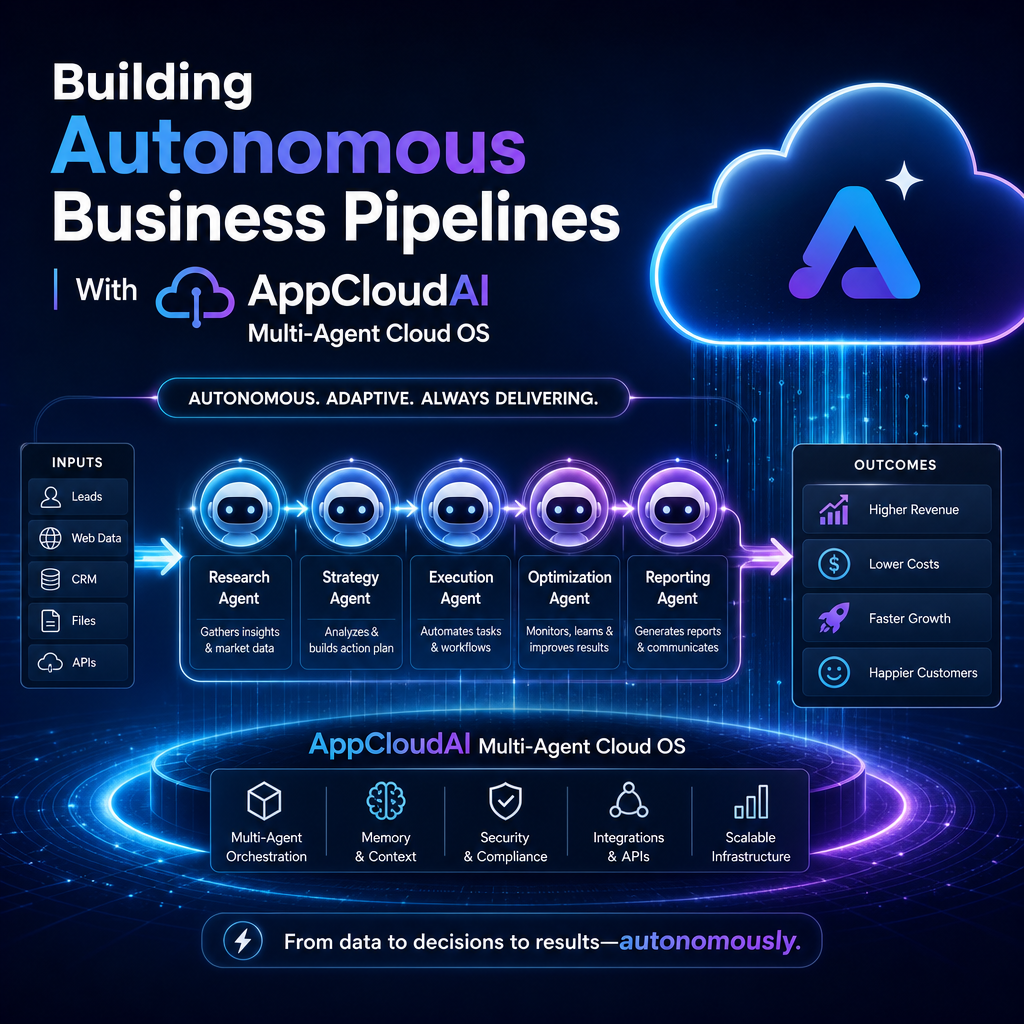
That is where building autonomous business pipelines with AppCloudAI’s Multi‑Agent Cloud OS becomes compelling. Instead of treating automation as a collection of one-off scripts, this approach treats your business workflow as a coordinated system of intelligent agents that can plan, act, monitor, and improve over time.

The result is not just faster execution. It is a pipeline that can adapt to real business context.
What Is a Multi-Agent Cloud OS?
At a high level, a multi-agent cloud operating system brings together specialized AI agents inside a shared cloud environment. Each agent can focus on a distinct role while collaborating with others to complete larger workflows.

For example, one agent might:

- monitor incoming data
- classify requests
- trigger downstream actions
- generate summaries
- escalate exceptions
- update business systems
Instead of forcing a single model to do everything, the system distributes work across agents with defined responsibilities. That structure makes complex automation more reliable, easier to manage, and more scalable across departments.
With AppCloudAI’s Multi‑Agent Cloud OS, the key advantage is orchestration. Agents are not acting in isolation. They operate within a coordinated framework that connects logic, data, tasks, and outcomes.
From Automation to Autonomy
Traditional automation follows fixed rules:
- If a form is submitted, send an email
- If a deal closes, create an invoice
- If a ticket contains a keyword, assign it to a queue
These rules are useful, but they are limited. They cannot easily reason through edge cases, prioritize work dynamically, or collaborate across multiple steps without extensive manual setup.
Autonomous pipelines go further.
They can interpret intent, make context-aware decisions, and keep work moving with less human intervention. In practice, that means the pipeline can handle variation rather than fail because the input did not match a rigid template.
This is the real promise behind building autonomous business pipelines with AppCloudAI’s Multi‑Agent Cloud OS: moving from static task automation to intelligent operational flow.
What an Autonomous Business Pipeline Looks Like
1. Intake and Understanding
The pipeline begins by collecting data from channels such as forms, chat, email, APIs, or internal platforms.
An intake agent reviews the input, extracts meaning, and classifies the request. That could mean identifying a high-value sales lead, detecting a support escalation, or recognizing a finance approval task.
2. Coordination and Decisioning
A coordination layer assigns work to the right agents based on business goals and predefined rules.
For example:
- a research agent gathers supporting data
- a compliance agent checks policy constraints
- a communication agent drafts a response
- an operations agent updates connected systems
Because the agents work together, the pipeline can complete a multi-step process without constant human routing.
3. Execution Across Tools
The value of autonomy increases when the system can act across the business stack.
A well-designed pipeline can:
- write to the CRM
- create tasks in project tools
- trigger customer communications
- generate internal reports
- sync information between cloud apps
This turns AI from an assistant into an active operational layer.
4. Monitoring and Improvement
Autonomous does not mean uncontrolled.
A strong multi-agent system includes monitoring, logs, thresholds, human approval steps where needed, and feedback loops for refinement. That allows teams to track performance, catch exceptions, and improve workflows over time.
Real Business Use Cases
The strongest use cases are the ones with repetitive volume, cross-functional dependencies, and high context-switching costs.
Sales Operations
Agents can qualify inbound leads, enrich records, prioritize opportunities, draft outreach, and push structured insights into the CRM.
Customer Support
A pipeline can classify incoming tickets, suggest resolutions, retrieve account context, escalate urgent issues, and generate follow-up communication automatically.
Marketing Workflows
Teams can automate campaign briefs, content planning, performance summaries, audience segmentation, and lead handoff to sales.
Finance and Admin
Recurring approvals, invoice routing, document checks, and status reporting can all be handled through coordinated agents rather than manual inbox management.
Benefits Beyond Speed
Faster execution is only the beginning. The deeper benefits include:
- Consistency: agents follow defined processes every time
- Scalability: workflows handle more volume without proportional headcount growth
- Visibility: centralized orchestration improves tracking and accountability
- Resilience: specialized agents reduce the brittleness of monolithic automations
- Focus: teams spend less time on repetitive coordination and more time on decisions
For growing companies, these benefits can compound quickly.
How to Start Small and Scale Smart
You do not need to redesign the entire business at once. The best approach is to start with one pipeline where delays, manual work, or errors are already obvious.
Look for a workflow that is:
- frequent
- rules-driven but not fully predictable
- spread across multiple tools or teams
- important enough to measure
Then define the agents, the handoffs, the success metrics, and the guardrails.
From there, you can expand the model into adjacent functions and gradually create a broader autonomous operating layer.
The Future of Operational AI
AI adoption is shifting from isolated chat interfaces to embedded systems that run actual business work. That shift is why building autonomous business pipelines with AppCloudAI’s Multi‑Agent Cloud OS matters.
It represents a move toward software that does not just assist people with tasks, but actively coordinates outcomes across the organization.
For businesses aiming to reduce friction, increase responsiveness, and scale without chaos, autonomous pipelines are quickly becoming more than an experiment. They are becoming infrastructure.