How AI App Builders Work: From Prompts to Functional Applications
How AI App Builders Work
Creating an app once required a team of developers, designers, and product specialists. AI app builders are changing that process by letting people describe an idea in everyday language and use artificial intelligence to turn it into a working application.
These tools can speed up development, especially for prototypes and straightforward business apps. They do not remove every technical challenge, though. Understanding how AI app builders work helps you choose the right tool and know what to expect from the results.

From a Prompt to an App Plan
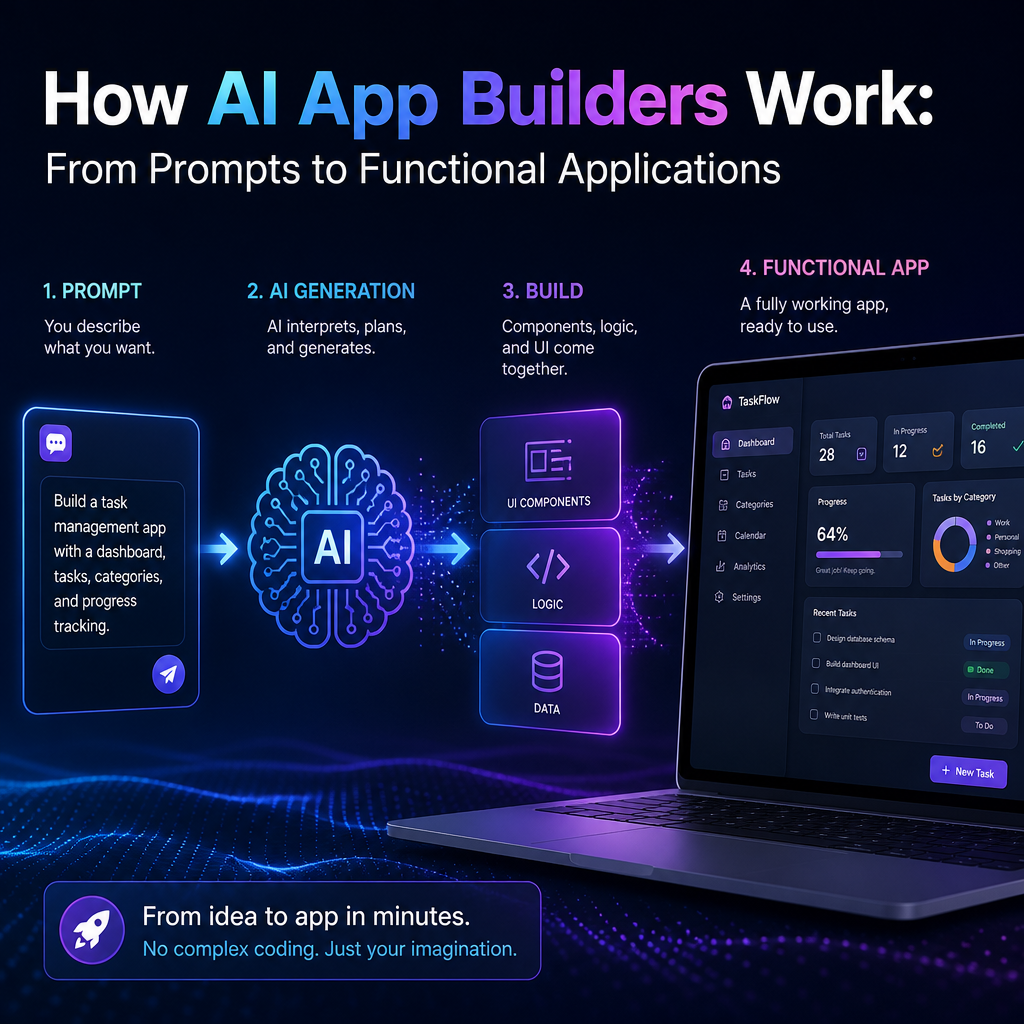
The process often begins with a written description of the app. A user might request a booking system, inventory tracker, or customer support portal and explain who will use it and what it should do.
The builder analyzes the prompt to identify the app’s likely requirements. It may break the request into features, such as:

- User accounts and sign-in
- Forms for entering information
- Search, filters, or dashboards
- Data storage and retrieval
- Notifications or other automated actions
Some platforms ask follow-up questions or provide a visual planning step. This helps clarify details before the app is generated. A more specific prompt usually leads to a more useful starting point.

Generating the Interface and Logic
Once it has a plan, the AI creates parts of the app. Depending on the platform, these might include page layouts, buttons, forms, workflows, and code.
For example, a user could ask for an employee directory with profile pages and a department filter. The builder might generate a list view, a search or filter control, and a form for adding employee details.
Behind the scenes, different technologies may be involved. Large language models can interpret instructions and generate text or code. Other systems may assemble interface components, connect data sources, or apply design rules. The user sees a single builder, but the result may come from several AI and software services working together.
Connecting Data and Services
An app is more than its screens. It often needs to save information, retrieve it, and communicate with other tools.
AI app builders may provide built-in databases or connect to external services through integrations and application programming interfaces (APIs). A generated app might store customer requests, send an email when a form is submitted, or display information from a spreadsheet.
The exact capabilities vary. Some builders rely on simple, managed storage, while others allow developers to configure databases and integrations in more detail. Before choosing a platform, check whether it supports the data sources, authentication methods, and services your app requires.
Testing and Improving the Result
The first generated version is usually a draft, not a finished product. Users test it, identify problems, and request changes in plain language or through a visual editor.
A prompt such as “Add a status filter to the dashboard” may update the interface and its behavior. The builder then generates or modifies the relevant components. This back-and-forth is one of the main ways AI app development works: the user provides direction, the AI makes changes, and testing reveals what still needs attention.
It is important to test common tasks from beginning to end. Check that forms save correctly, buttons perform the expected actions, and the app displays helpful messages when information is missing or something goes wrong.
What AI App Builders Do Well—and Where They Need Help
AI builders can be useful for prototypes, internal tools, simple customer portals, and routine workflows. They may reduce the time needed to create an initial version and make app creation more accessible to people without deep programming experience.
However, AI can misunderstand instructions, generate incomplete logic, or overlook security and accessibility needs. Complex products may require custom development, careful data architecture, and expert review. Generated code and configurations should be checked rather than treated as automatically reliable.
Pay special attention to:
- Security: Protect accounts, sensitive data, and administrative features.
- Privacy: Understand where information is stored and how it is used.
- Accessibility: Make sure people can navigate and use the app in different ways.
- Scalability: Confirm that the platform can handle expected growth and usage.
A Faster Starting Point, Not a Substitute for Judgment
So, how AI app builders work is best understood as a collaboration between a person and a set of automated tools. The user describes a need, the platform generates an initial structure, and repeated testing and refinement turn that structure into a more useful app.
The technology can make development faster, but good results still depend on clear requirements and thoughtful review. Treat AI-generated apps as starting points: test them carefully, check their limitations, and involve technical expertise when the project handles sensitive information or must meet demanding reliability requirements.