How AI Is Transforming App Development from Idea to Launch
From Idea to Launch: How AI Is Transforming App Development
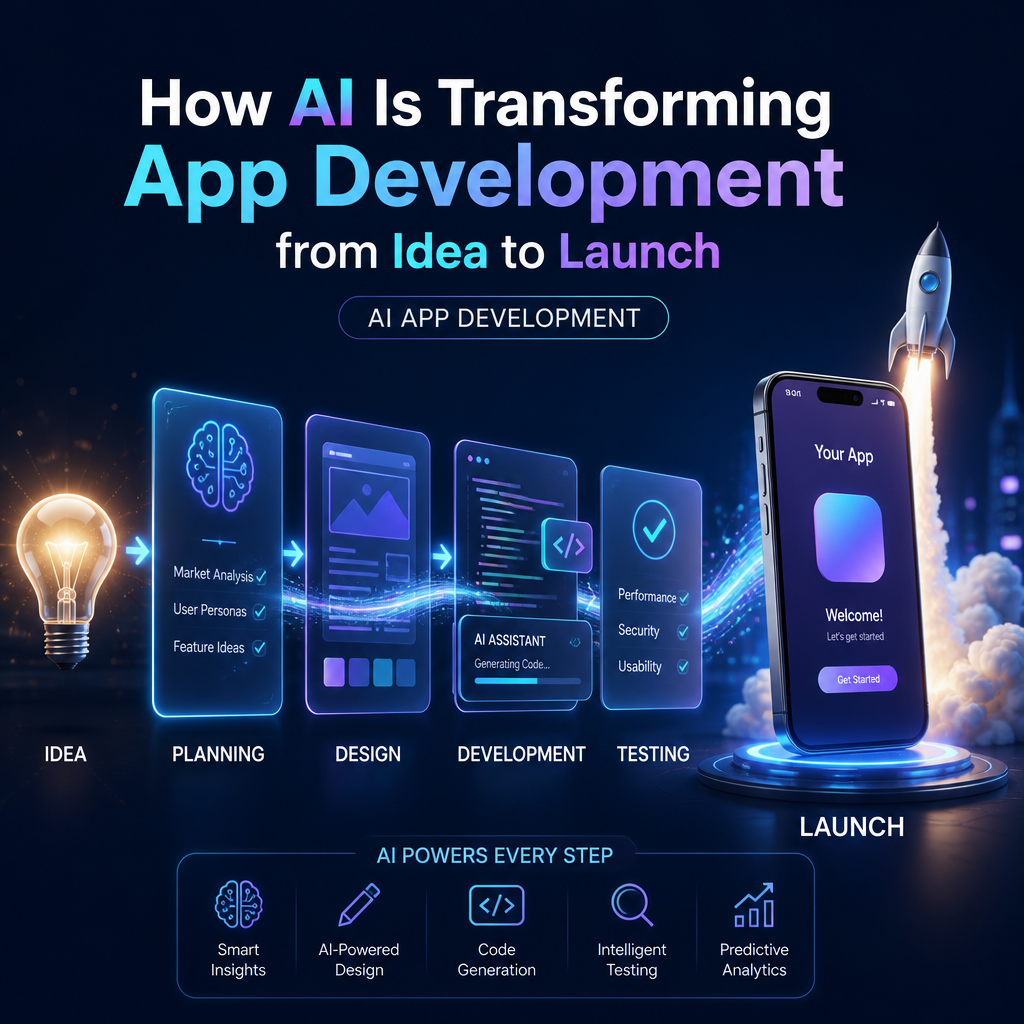
Building an app has traditionally required months of planning, design, coding, and testing. Artificial intelligence is changing that process. By helping teams move faster and make better-informed decisions, AI is transforming app development from the first idea through launch—and beyond.
AI does not replace the people who understand a product’s purpose or its users. Instead, it can take on repetitive tasks, surface useful insights, and help developers explore more possibilities in less time.

Turning an Idea Into a Clear Plan
Every app starts with a problem to solve. AI tools can help teams examine that problem, organize early research, and turn rough concepts into practical next steps.
For example, generative AI can summarize user interviews, group common feedback, draft user personas, and suggest questions for further research. It can also help founders compare feature ideas or outline user journeys. These outputs are useful starting points, but they should be checked against real customer evidence.

AI can also support early planning by helping teams:

- Draft product requirements and project briefs
- Identify potential user needs and friction points
- Organize features by priority
- Explore competing products and market trends
This can make the planning stage more efficient, especially for small teams. Human judgment remains essential: a polished AI-generated plan is not proof that people want the product.
Designing and Prototyping Faster
Once a concept is defined, teams need to show how it might work. AI-enabled design tools can turn written prompts into interface concepts, suggest layouts, and generate variations for testing. Designers can use these drafts to explore directions quickly rather than starting every screen from scratch.
AI can also help make prototypes more inclusive. Tools may flag low-contrast colors, identify accessibility concerns, or suggest clearer interface copy. These checks are valuable, but they do not replace testing with people who have different abilities, devices, and expectations.
A faster prototype gives teams something concrete to discuss. Stakeholders can react to a working flow, and potential users can point out confusing steps before they become expensive features.
Accelerating Development Without Skipping Review
During development, AI coding assistants can suggest code, explain unfamiliar functions, generate test cases, and help locate bugs. They can reduce time spent on repetitive work and provide support when developers are learning a new framework or working in an unfamiliar codebase.
However, generated code still needs careful review. It may be inaccurate, inefficient, insecure, or inconsistent with a project’s architecture. Developers must understand what the code does, check its dependencies, and test it in context.
The most effective approach is to treat AI as a collaborator—not an autopilot. Teams can use it to speed up routine tasks while relying on skilled developers to make architectural decisions, protect user data, and maintain quality.
Improving Testing and App Quality
Testing is another area where AI is making a difference. AI-assisted tools can help create test scenarios, detect patterns in crash reports, and identify parts of an app that may need closer attention. Automated tests can also be updated more quickly as features change.
This matters because software quality depends on more than whether an app works on one device. Teams must consider different operating systems, screen sizes, network conditions, and user behaviors. AI can help expand test coverage, but real-device testing and human feedback remain important.
Before launch, teams should still verify:
- Core features work as intended
- Sensitive data is handled securely
- The interface is accessible and understandable
- Performance is acceptable across common devices
- Errors and edge cases are handled gracefully
Using AI After Launch
Launching an app is the beginning of another learning cycle. Analytics, support messages, reviews, and user behavior can reveal what needs improvement. AI can help categorize feedback, summarize recurring complaints, and flag unusual changes in usage.
With appropriate privacy safeguards, these insights can help teams decide which fixes or features deserve attention first. They can also support more responsive experiences, such as personalized recommendations or helpful in-app guidance. Any personalization should be transparent and based on responsible data practices.
The Human Advantage in AI-Powered Development
AI is transforming app development by reducing friction at nearly every stage: research, design, coding, testing, and ongoing improvement. That does not mean every app should be built faster at any cost. Speed is valuable only when it leads to a product that is useful, reliable, and safe.
The strongest teams combine AI’s ability to process information and automate routine tasks with human creativity, technical expertise, and empathy. From idea to launch, that partnership can help turn promising concepts into better apps—and give teams more time to focus on the people those apps are meant to serve.