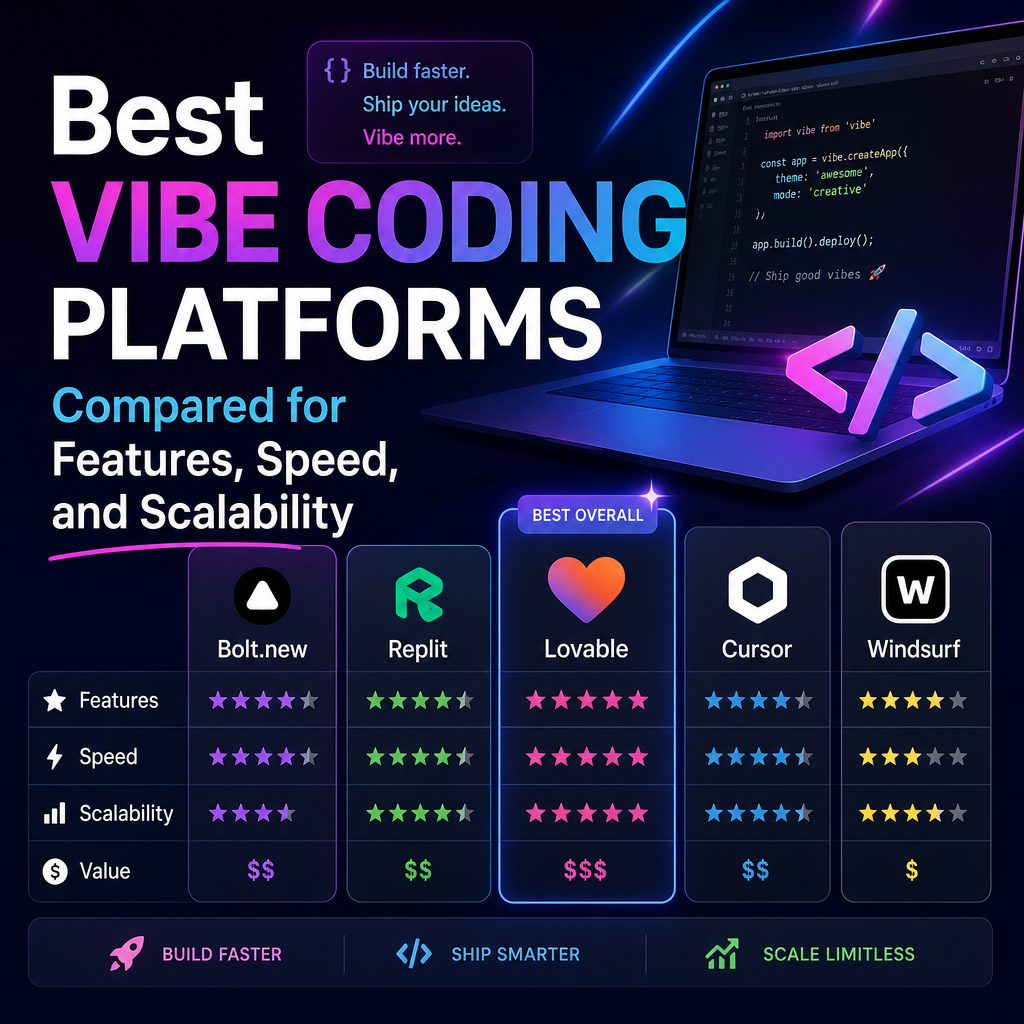
Best Vibe Coding Platforms Compared for Features, Speed, and Scalability
Top Vibe Coding Platforms Compared: Features, Speed, and Scalability
Vibe coding platforms turn plain-language prompts into working software, helping people move from idea to prototype without writing every line by hand. But these tools differ in what they build, how quickly they work, and how well their projects can grow.
The best choice depends on your goal: a polished interface, a full-stack web app, a collaborative coding workspace, or a fast experiment. Here’s how five popular options compare.

At a Glance
| Platform | Best for | Main strength | Scalability consideration |
|---|---|---|---|
| Replit | Building and hosting in one place | Integrated development environment | Review generated architecture before growing |
| Lovable | Full-stack web app prototypes | Fast prompt-to-app workflow | Check backend structure and data handling |
| Bolt.new | Browser-based app generation | Quick iteration and previews | Larger projects may need hands-on code organization |
| v0 | UI and frontend development | Strong interface generation | Often paired with other tools for backend needs |
| Cursor | Developing with AI in an existing codebase | Flexible, code-centered workflow | Depends on your stack and engineering practices |
Comparing the Platforms
Replit: A Convenient All-in-One Workspace
Replit combines an AI-assisted coding environment with tools for running and deploying projects. That makes it useful for beginners who want to create, test, and share an app without assembling a development setup first.
Its integrated workflow can make early development feel quick. However, convenience doesn’t automatically mean an app is ready for heavy traffic or complex business logic. As a project grows, developers should review its code, security, database design, and hosting requirements.

Lovable: Fast Full-Stack Prototypes
Lovable is designed to turn natural-language instructions into web applications, including interfaces and backend connections. It can be a strong fit for founders or teams testing an idea, particularly when the first version needs to look and behave like a real product.

The speed comes from letting the platform make many implementation decisions. Before expanding a prototype, inspect those decisions: confirm that data models make sense, access controls are appropriate, and the code can be maintained by your team.
Bolt.new: Quick Browser-Based Building
Bolt.new offers a rapid way to generate and edit web apps in the browser. Its prompt-driven workflow and live previews make it appealing for experiments, demos, and early product concepts.
It can help users reach a visible result quickly, but rapid generation may leave cleanup for later. For larger apps, plan to organize components, test key flows, and validate integrations rather than treating an impressive preview as a finished product.
v0: A Frontend and UI Specialist
v0 is particularly useful for generating interface components and frontend layouts. It can help teams explore design directions, produce polished screens, and accelerate work in modern web frameworks.
Because its strongest role is frontend development, it may not be a complete solution for every full-stack app. Teams often connect the generated interface to their own backend, authentication, and data services. That separation can be an advantage when developers want more control over architecture.
Cursor: AI Assistance Inside a Codebase
Cursor takes a more code-centered approach. Rather than focusing only on generating an app from a prompt, it helps developers work with an existing project, understand files, make changes, and iterate with AI assistance.
This can suit experienced builders and teams that already have a preferred framework or repository. Initial setup may take longer than using a one-prompt app builder, but developers retain more direct control over the code and technical decisions.
Speed: From Prompt to First Draft
For a quick visual prototype, platforms such as Lovable, Bolt.new, and v0 can produce a tangible result with relatively little setup. Replit also offers a smooth start by combining coding and execution in one workspace. Cursor can be fast once a project is underway, especially when modifying an established codebase.
Speed should be measured beyond the first generation. A useful platform also makes it easy to correct errors, inspect changes, and keep improving the app without introducing confusion.
Scalability: Look Beyond the Demo
No AI platform automatically makes an application scalable. Growth depends on the application’s architecture, database, hosting environment, security, testing, and development practices.
Before committing to a tool, check whether you can access and maintain the generated code, connect services you need, and move the project to suitable infrastructure. Also consider how the platform handles version control, collaboration, and debugging. These details matter more as users and features accumulate.
How to Choose
- Choose Replit for an approachable workspace that combines coding and deployment.
- Choose Lovable or Bolt.new to quickly explore full-stack app ideas.
- Choose v0 when interface generation is the main priority.
- Choose Cursor when you want AI support while keeping close control of a codebase.
The strongest vibe coding platform is the one that matches your project’s next step—not just the speed of its first demo. Start with a small build, test the workflow, and evaluate how easily you can understand, revise, and extend the resulting code.